

The quality of the software produced is one of the top issues while we design any application. A customer either developing a web application, a mobile app or enterprise solutions always need and expect application to work as it is expected from it for each and every time.
This is where the black box testing methods along with their examples come in. Unlike other testings where a person who will do it needs to read/view the code and test-black box testing is a approach which is only concerned about the output based on the input, and it does not need to have any idea about the internal working of software-it focuses on the functionalities and requirements of the application instead.
In this write up, we’ll focus on the fundamentalblack box testing methodswith useful examples that both the newcomers to the quality assurance field as well as skilled professionals can utilize for their projects.
Businesses looking to improve their software development and IT operations often need reliable technology partners. Choosing from the best managed IT providers in Canada can help organisations access professional IT support, infrastructure management, and technology services that support business growth.
Table of Contents
What Is Black Box Testing?
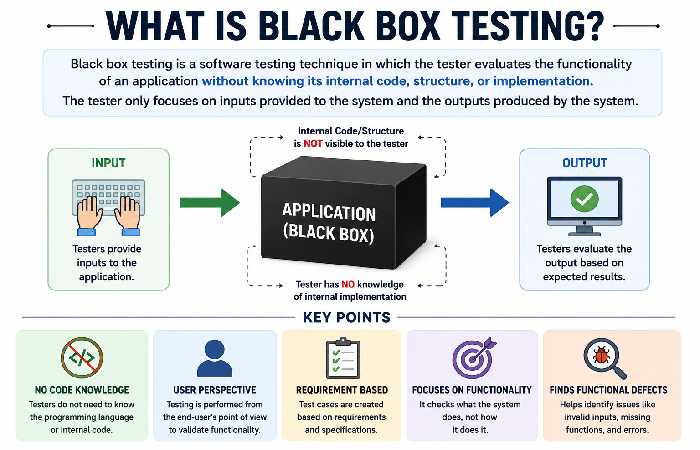
Black box testing – how it works Black box testing is software testing that involves checking an app’s ability to perform without looking at the actual source code or ever knowing about the underlying structure or functionality. In black box testing, rather than probing the program’s interior workings and programming logic, professionals can focus on the user inputs, expected outputs,, business rules, Functional Requirements, user experience and overall performance. Essentially, you can treat black box testing like testing a remote TV click – you don’t need to be aware of the interior electronics on TV to determine if press on volume control button that’s make volume increases in TV.
Black Box Testing vs White Box Testing
| Feature | Black Box Testing | White Box Testing |
|---|---|---|
| Source code knowledge | Not required | Required |
| Focus | Functionality | Internal logic |
| Performed by | QA testers, users | Developers |
| Test basis | Requirements | Code structure |
| User perspective | Yes | No |
Popular Black Box Testing Techniques with Examples
Several structured techniques help testers reduce the number of test cases while maintaining good test coverage.
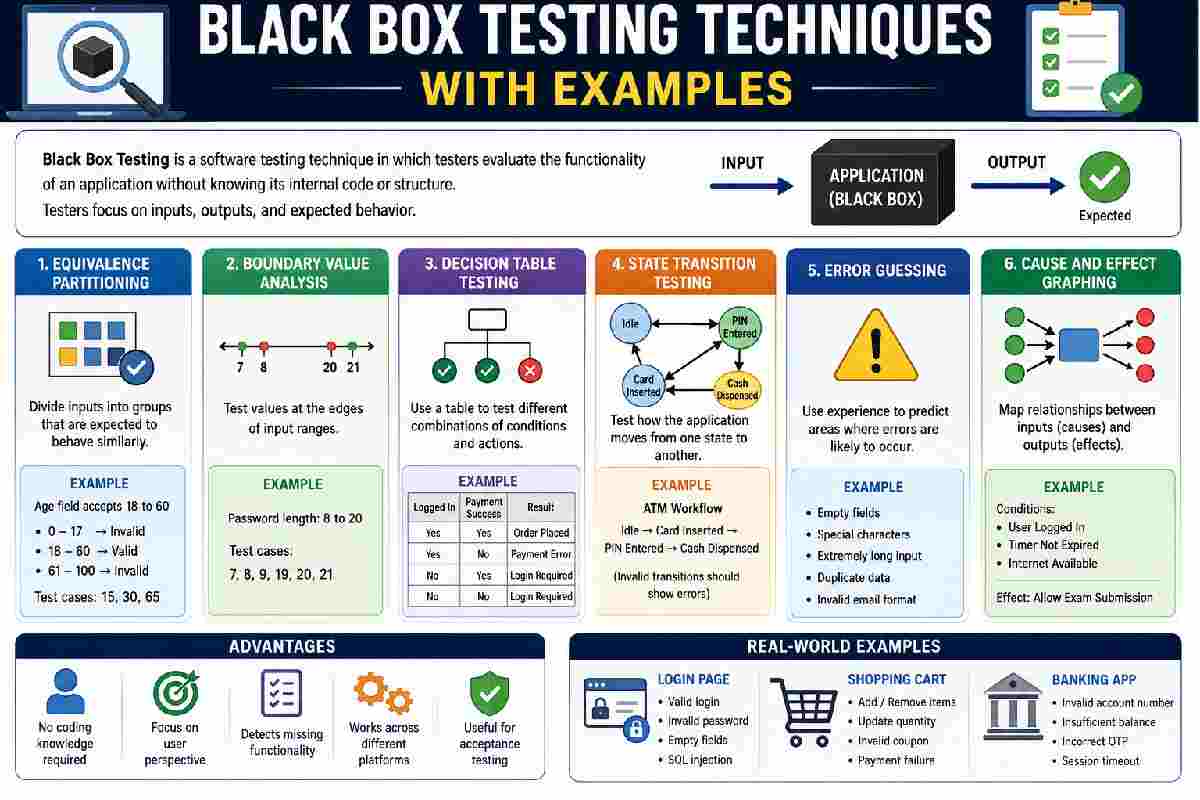
1. Equivalence Partitioning
Equivalence Partitioning partitions input values into sets where each set should behave identically. The test uses one value from each set rather than each individual value in the input.
Example
Given a website with an age input from 18-60.
Possible partitions:
| Input Range | Expected Result |
|---|---|
| Below 18 | Invalid |
| 18–60 | Valid |
| Above 60 | Invalid |
Rather than testing every age, you could test:
- 15
- 30
- 65
This significantly reduces testing effort.
2. Boundary Value Analysis (BVA)
Boundary Value Analysis focuses on values near the edges of valid input ranges because defects commonly occur at boundaries.
Example
Password length requirement:
Minimum: 8 characters
Maximum: 20 characters
Test values:
- 7
- 8
- 9
- 19
- 20
- 21
These cases help uncover validation errors.
3. Decision Table Testing
Decision tables are useful when software behaviour depends on multiple conditions.
Example
Online shopping checkout
Conditions:
- User logged in
- Payment successful
| Logged In | Payment Success | Result |
|---|---|---|
| Yes | Yes | Order placed |
| Yes | No | Payment error |
| No | Yes | Login required |
| No | No | Login required |
Decision tables simplify complex business rules.
4. State Transition Testing
Applications often move between different states.
Testing these transitions ensures the application behaves correctly.
Example
Bank ATM
States include:
- Idle
- Card inserted
- PIN entered
- Transaction selected
- Cash dispensed
Invalid transitions, such as requesting cash before entering a PIN, should produce appropriate error messages.
5. Error Guessing
This technique relies on tester experience.
Instead of following predefined rules, testers anticipate where problems might occur.
Examples include:
- Empty fields
- Special characters
- Extremely long inputs
- Duplicate records
- Invalid email formats
Although informal, experienced testers often discover critical bugs through error guessing.
6. Cause and Effect Graphing
This method maps relationships between inputs and outputs.
It is particularly useful for complex validation logic involving multiple conditions.
Example
An online exam platform allows submission only if:
- Student logged in
- Timer not expired
- Internet available
Graphing these relationships ensures all combinations are tested.
Workflow: How Black Box Testing Is Performed
Software testing is also important in enterprise content management systems, where organisations manage, store, and access large volumes of digital information. Understanding Enterprise Content Management (ECM) can help businesses recognise how structured content management supports efficient digital workflows and information handling.
A typical black box testing process follows these steps:
Understand Requirements
        ↓
Identify Test Scenarios
        ↓
Design Test Cases
        ↓
Prepare Test Data
        ↓
Execute Tests
        ↓
Compare Actual vs Expected Results
        ↓
Report Defects
        ↓
Retest After Fixes
Following a structured workflow improves consistency and traceability throughout the testing lifecycle.
Comparison of Black Box Testing Techniques
| Technique | Best Used For | Difficulty | Typical Use Case |
|---|---|---|---|
| Equivalence Partitioning | Large input ranges | Easy | Form validation |
| Boundary Value Analysis | Numeric limits | Easy | Age validation |
| Decision Table | Business rules | Medium | Insurance systems |
| State Transition | Workflow testing | Medium | Banking apps |
| Error Guessing | Experienced testers | Medium | Exploratory testing |
| Cause & Effect Graph | Complex conditions | Advanced | Enterprise systems |
Real-World Examples
Login Page
Tests include:
- Correct credentials
- Wrong password
- Empty username
- Empty password
- SQL injection attempts
- Invalid email format
Online Shopping Cart
Possible scenarios:
- Add products
- Remove products
- Update quantity
- Invalid coupon
- Expired coupon
- Payment failure
Banking Application
Examples include:
- Invalid account number
- Transfer exceeding balance
- Incorrect OTP
- Session timeout
- Duplicate transaction prevention
Advantages of Black Box Testing
- No programming knowledge required
- Focuses on user experience
- Suitable for functional testing
- Detects missing functionality
- Works across different platforms
- Supports independent quality assurance teams
Limitations
Black box testing also has practical limitations.
These include:
- Cannot identify hidden code defects directly
- Test coverage depends on requirements quality
- Some internal logic remains untested
- Large systems may require extensive test cases
Because of these limitations, organisations often combine black box testing with white box and grey box testing.
Expectations: What Black Box Testing Can and Cannot Do
It is important to set realistic expectations.
Black box testing helps identify issues affecting end users, including broken workflows, incorrect outputs, validation errors, and usability problems.
However, it does not guarantee complete software quality. Internal code quality, memory leaks, security vulnerabilities, and inefficient algorithms often require additional testing methods.
The best results usually come from combining multiple testing strategies throughout the software development lifecycle.
Modern cloud-based applications also require strong security measures alongside functional testing. Following cloud-native security practices helps organisations protect applications, infrastructure, and sensitive data while maintaining reliable performance across cloud environments.
When Should You Use Black Box Testing?
Black box testing is particularly useful during:
- Functional testing
- System testing
- Acceptance testing
- Regression testing
- User acceptance testing (UAT)
- API validation
- Mobile application testing
- Web application testing
It is especially valuable when verifying that software behaves according to documented business requirements.
Best Practices
To improve testing effectiveness:
- Understand business requirements thoroughly.
- Create clear, reusable test cases.
- Prioritise high-risk scenarios.
- Test both valid and invalid inputs.
- Include edge cases and boundary values.
- Automate repetitive functional tests where appropriate.
- Maintain traceability between requirements and test cases.
Frequently Asked Questions
Most Common Black Box Testing techniques with examples Equivalence Partitioning, Boundary Value Analysis, Decision Table Testing, State Transition Testing, Error Guessing and Cause and Effect graphing are the most often used techniques. Each test technique evaluates software from a customer’s point of view.
Black Box testing beginner-friendly?
Yes, because of the absence of programming language; testers of new technology can begin to learn the testing technique of the black-box tests that focus on requirements that are documented.
Which is greater black box and grey box test?
Grey Box Testing is when someone who know something about the back-end is testing or knows a piece of the code but also applies black box. No box testing in what senseBlack box testing looks at the software for a user’s point ofview of how a program is doing.
Is Black box test automated?
Yes, numerous black-testing automation framework could help web based testing, Mobile application testing, desktop application testing and API testing test functional area quicken the procedure.
Conclusion
It is crucial for individuals involved in the software quality assurance to understand black box testing techniques along with relevant examples. Applying techniques such as Equivalence Partitioning, Boundary Value Analysis, Decision Table Testing and State Transition Testing, teams can effectively devise test cases that expose functional defects with the minimal of effort.